

Orange Holiday Europe eSIM - 30 Days 50GB High-Speed Data, Unlimited Calls & SMS in 38 European Countries, Bonus 120 Min Global Calls + 1000 SMS, 5G/4G Hotspot, Instant Email Delivery (30 Days 50GB)
Product details
| Management number | 228226787 | Release Date | 2026/05/31 | List Price | $16.00 | Model Number | 228226787 | ||
|---|---|---|---|---|---|---|---|---|---|
| Category | |||||||||
QR code image directly to your phone.) Go to “Mobile Data / Cellular Plans” (iOS) or “SIM Card Management” (Android) in your phone’s settings. While connected to the internet, select “Add Mobile Data Plan / Add Cellular Plan” (iOS) or “Add SIM” (Android) and scan the QR code to install the eSIM. If scanning fails, you can manually enter the SM-DP+ Address and Activation Code provided in your order confirmation. If steps 3 or 4 fail, your phone may be network-locked by your carrier (i.e., it cannot connect to other carriers' networks). Please contact your carrier to unlock the device before using the eSIM. [Using the eSIM] Turn off your primary SIM card and enable the eSIM. Activate “Mobile Data / Cellular Service” (iOS) or “SIM Card” (Android) for the eSIM. If you still cannot connect to the internet, please set the APN manually and restart your device (see instructions below). [About APN Settings] For eSIMs covering multiple countries/regions: If you are unable to connect when entering a new area, try switching the APN manually (normally, this happens automatically). How to set APN: iOS: Settings → Cellular / Mobile Data → Cellular Data Network Android: Settings → Network & Internet → Mobile Network → Access Point Names (APN) → Create or Edit APN Enter the required APN information. Restart your phone.
- 【Instant Use | Quick Activation via QR Code】After your order status shows “Shipped,” simply follow the illustrated instructions to scan the QR code and activate your eSIM. If you need to use it immediately, please contact us via Amazon Buyer Messages / LINE (@billionconnect) or the methods shown in the image to receive your eSIM and installation guide as soon as possible.
- 【Europe eSIM | 50GB for 30 Days】50GB high-speed data valid for 30 days.Supports 5G / 4G LTE across Europe.Hotspot sharing supported. Data stops when used up.
- 【Unlimited Calls & SMS + International】Unlimited calls & SMS within Europe. Includes 120 mins international calls + 1000 international SMS. Dial #123# to check balance
- 【Voice & SMS limitations】 ①Voice calls and SMS services may be unstable for certain destinations, including calls to China due to carrier filtering, international routing conditions, or network policies. ②Premium-rate numbers (e.g., special service or toll numbers such as France “08” numbers) are not supported. ③Voice services are not available in Kenya due to local network limitations. ④For France usage exceeding 30 days, real-name registration is needed and should be completed within 20 days of activation to help ensure continued service. Please refer to the product images for guidance on real-name registration.
- 【Works with TikTok, ChatGPT & More】Use TikTok, ChatGPT, Google, Google Maps and other popular apps with no restrictions.
- 【Supported Countries 】France, Italy, Spain, the United Kingdom, Germany, Greece, Portugal, Austria, the Czech Republic, Norway, Sweden, Switzerland, Denmark, Finland, Ireland, Poland, Belgium, Hungary, the Netherlands, Iceland, Croatia, Romania, Slovakia, Lithuania, Latvia, Estonia, Luxembourg, Malta, Cyprus, Slovenia, Liechtenstein, Andorra, Azores, Aland Islands, Balearic Islands, etc. 50 countries
- 【Easy Setup | English Installation Guide Included】An English setup guide is available via QR code. Even first-time eSIM users can complete the installation easily.
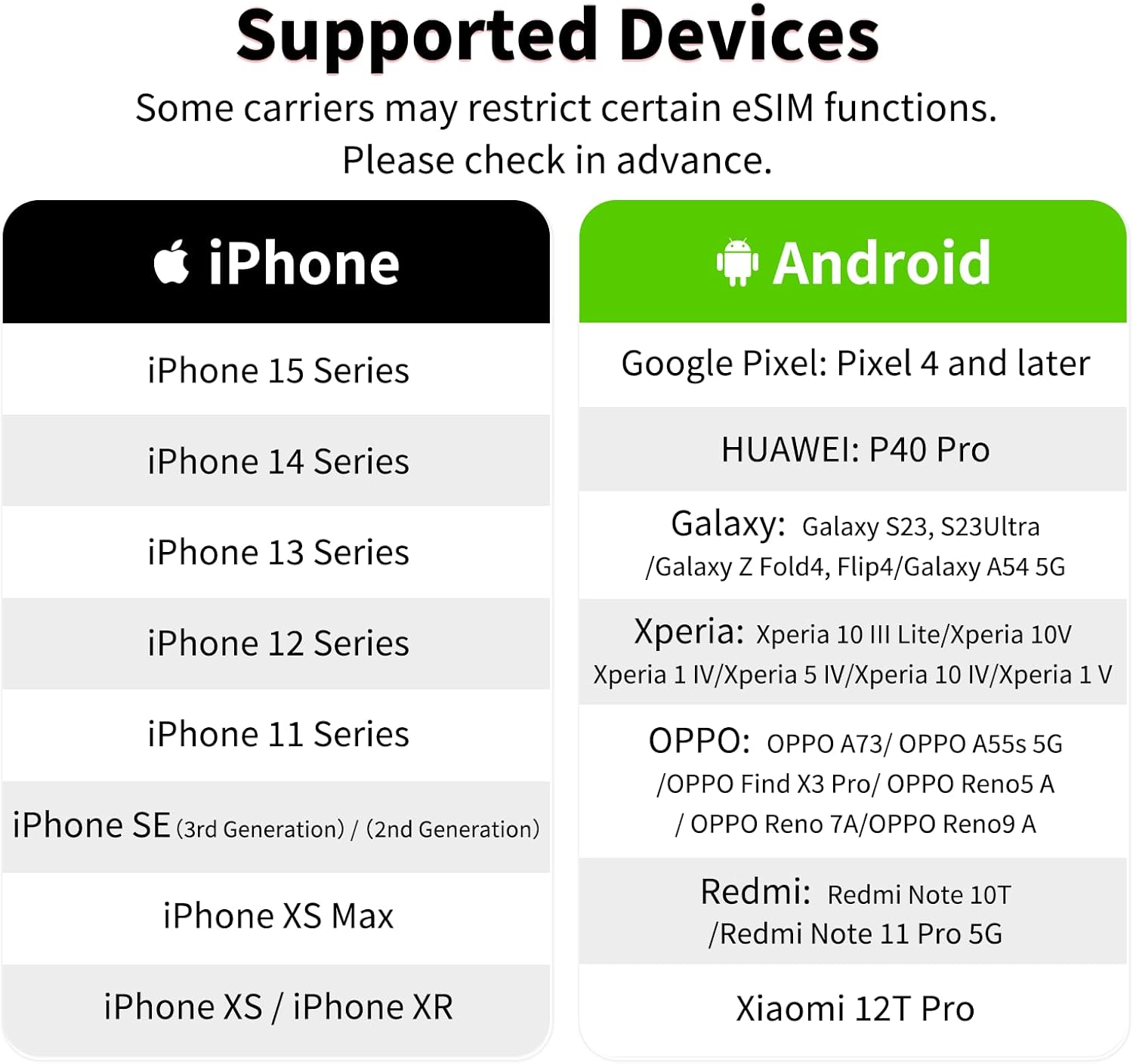
- 【Before Purchase | eSIM-Compatible Devices Required】This service is compatible only with eSIM-supported and carrier-unlocked devices. Dial *#06# on your phone. If an EID is displayed, your device supports eSIM.
- 【Plan Validity Calculation】Plan validity is calculated by calendar days (GMT+8). The validity period starts on the day of eSIM activation. Example: Activate a 3-day plan at 10:00 AM on October 1. Valid until 11:59 PM on October 3. This Europe eSIM is valid until January 8, 2027. Please activate the eSIM before the expiration date to avoid service unavailability.
- 【Multilingual Customer Support – Available 365 Days】Customer support is available via Amazon Buyer Messages and LINE (ID: @billionconnect) in English, Japanese, and Chinese. Operating Hours: 4:00 PM – 9:00 AM (PT)
| ASIN | B0FW4GJ7G3 |
|---|---|
| Brand | Billion Connect |
| Unit Count | 1.0 Count |
| Manufacturer | orange |
| Model Number | 30 Days 50GB |
| Number of Items | 100 |
| Service Provider | orange |
| Cellular Technology | LTE |
| Warranty Description | 90 Days |



Bestseller ranking
SIM Cards


Customers who viewed this product also viewed
Paw Protectors




Correction of product information
If you notice any omissions or errors in the product information on this page, please use the correction request form below.
Correction Request Form